 Brella OS
Run your agency on one record. Bird does the rest.
The operating system for commercial insurance agencies. Every form prints from the record, and Bird asks before anything reaches a customer.
Integrated with


Every form an agency files, printed from one record
- ACORD 125Commercial application
- ACORD 126General liability
- ACORD 130Workers’ comp
- ACORD 131Umbrella / excess
- ACORD 140Property
- Schedule of valuesEvery building, every value
- Completed applicationA PDF the moment they submit
- SupplementalQuestionnaire for the trade
- ACORD 25Certificate of liability
- ACORD 28Evidence of property
- ACORD 3Claim notice
- Broker of record letterOut for signature
- No known loss letterOut for signature
- E&O defence fileGenerated on demand
- BinderFiled on the policy
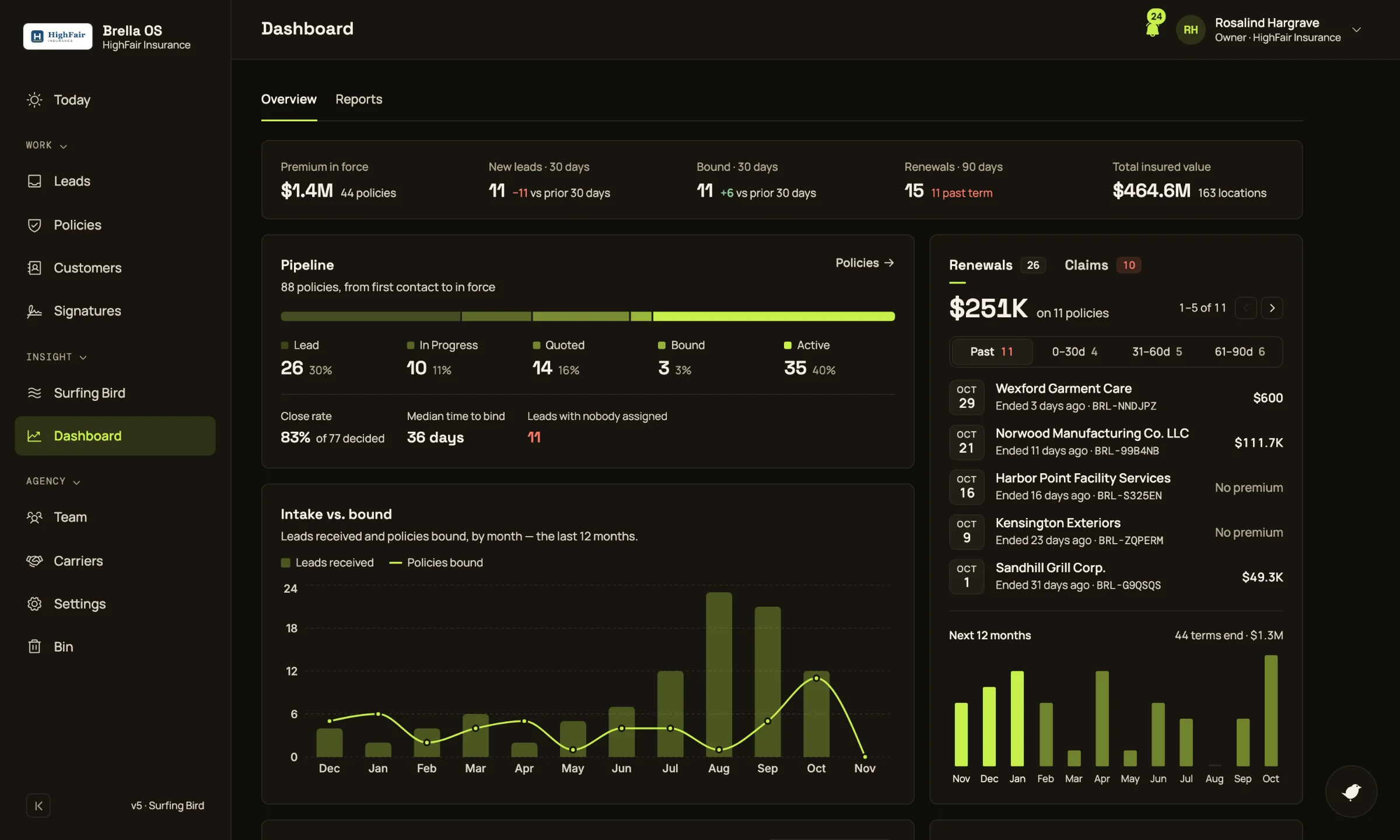
Go from “Where is that?” to “It’s on the record.”
If your book still lives across inboxes, carrier portals and spreadsheets, the answer arrives after the deadline. Brella OS keeps every fact on one record and puts the next thing to do in front of you.
Running a book without one record
- The renewal surfaces at 30 days
- The same address, typed into five forms
- A certificate goes out with no endorsement behind it
- The answer lives in one person’s inbox
Running it on Brella OS
- Renewals banded at 90, 60 and 30 days
- One record prints every form
- Certificates with no endorsement, flagged on Today
- Every answer lands on the record it belongs to
Bird turns agency busywork into work that’s done.
How Brella OS keeps renewals, forms and certificates moving, and shows you exactly what happened.
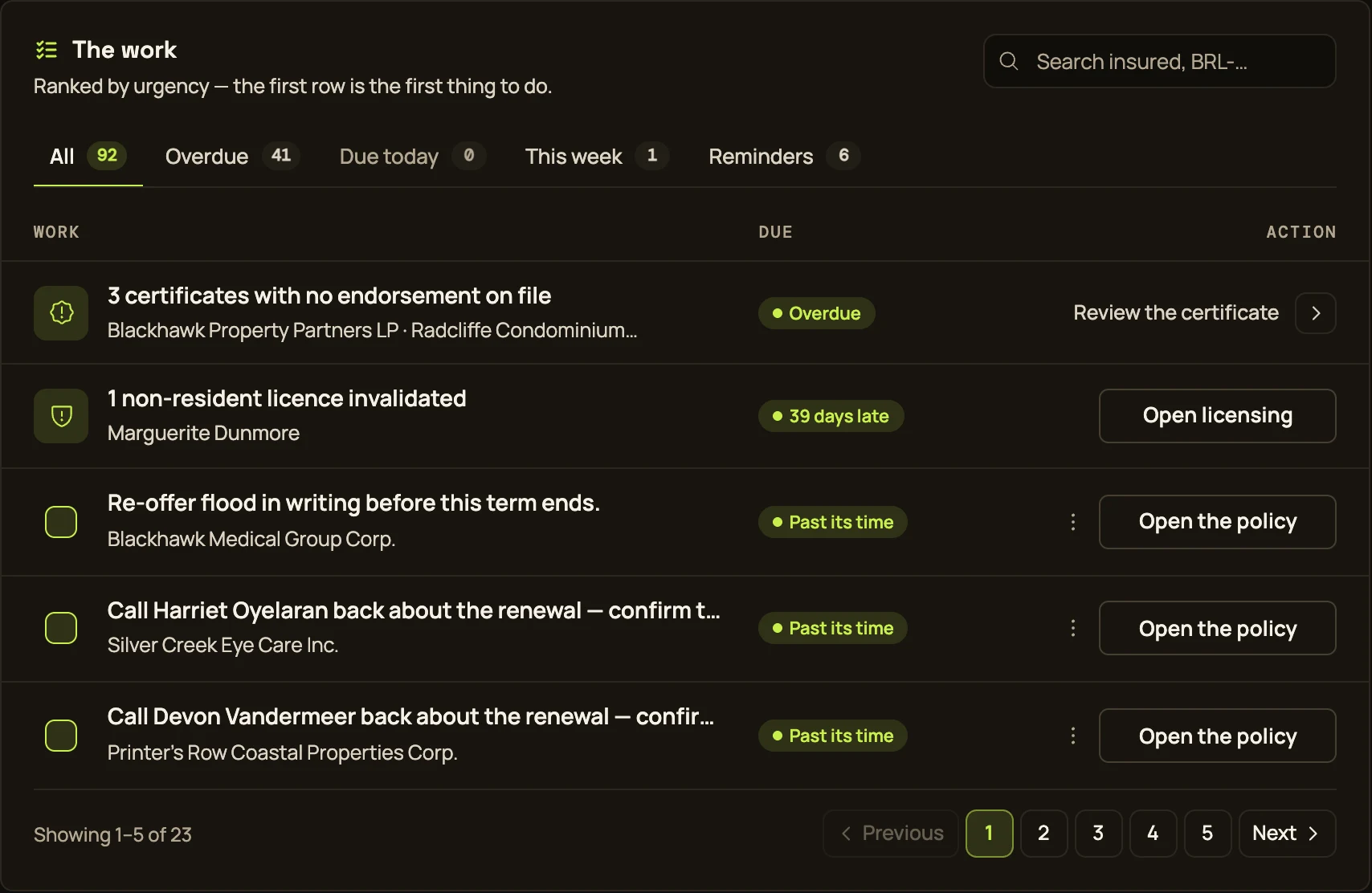
01Today
Start every day with the work that needs you
Today collects every item across the book that needs a person and ranks it, so the first row is the first thing to do. Nothing on it is invented: each item comes from a rule the rest of the product uses.
- Renewals in their 90, 60 and 30-day window
- Certificates with no endorsement on file, and claims with no carrier update
- Questions nobody answered, licences at risk, signatures gone quiet
One ranked list, with the action on the row. Or hand the row to Bird.
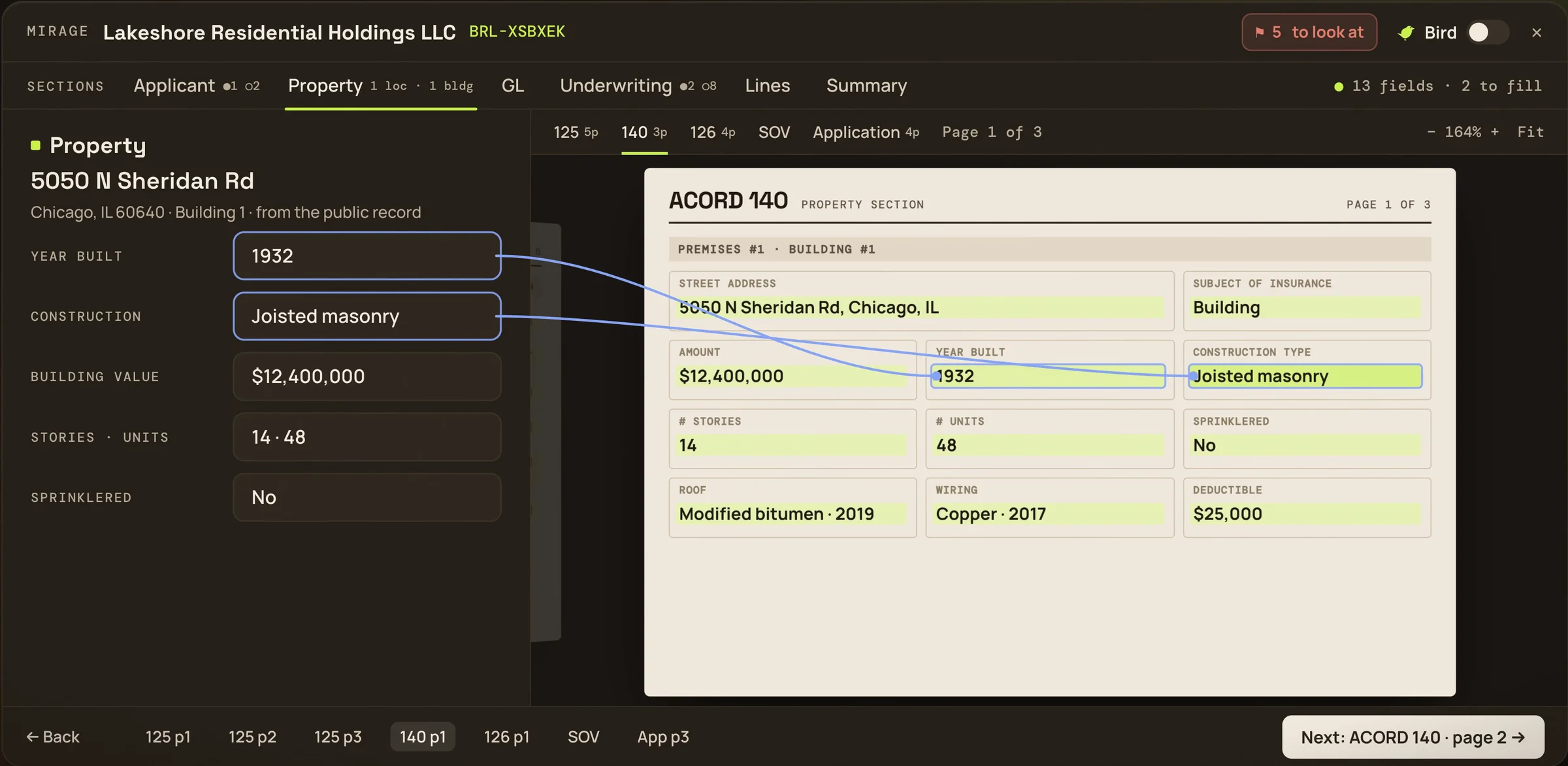
02Mirage
Read every form before it goes to market
Mirage walks each form a lead goes to quote with, page by page, with the policy’s own fields beside it. Every box is traced to the field that filled it, and nothing is filed until you finish.
- ACORD 125, 126, 127, 130, 131 and 140, the application and the schedule of values
- Bird flags answers that contradict each other, and values that don’t fit
- Untick a form and it stays home; the 125 you file is the 125 you previewed
No form goes to market saying something the record doesn’t.
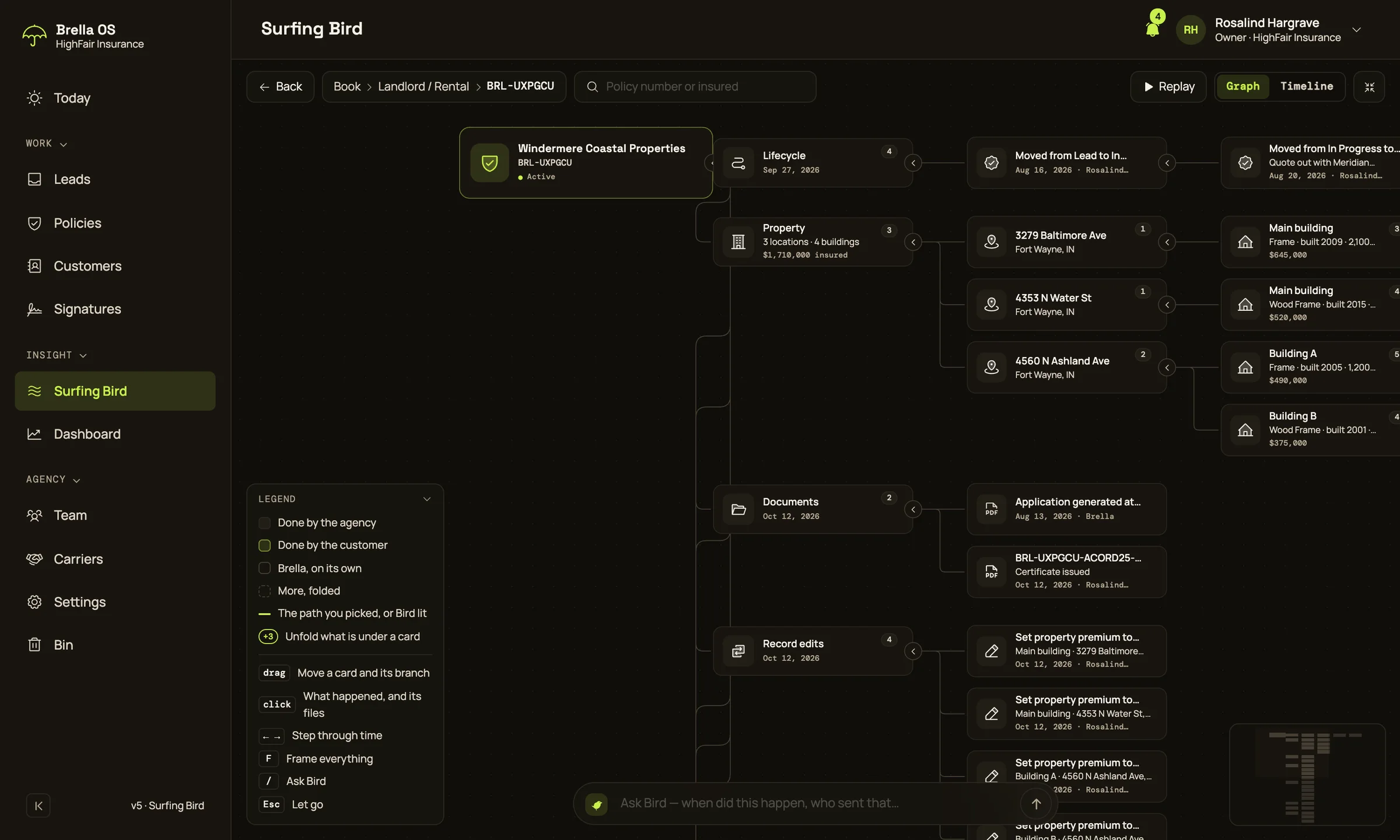
03Surfing Bird
See a policy’s whole life, and ask about it
Surfing Bird lays a policy out as a tree: its stages, buildings, documents, signatures and changes. Click any step to see when it happened and who did it, or ask Bird and it takes you there.
- Every step says when, who, and whether it was your agency, the client or Brella
- Ask “when did Marisol sign?” and Bird opens the step with its documents
- Or open the whole book, every policy by type
The answer to “what happened here?” in seconds, with the proof beside it.
Bird
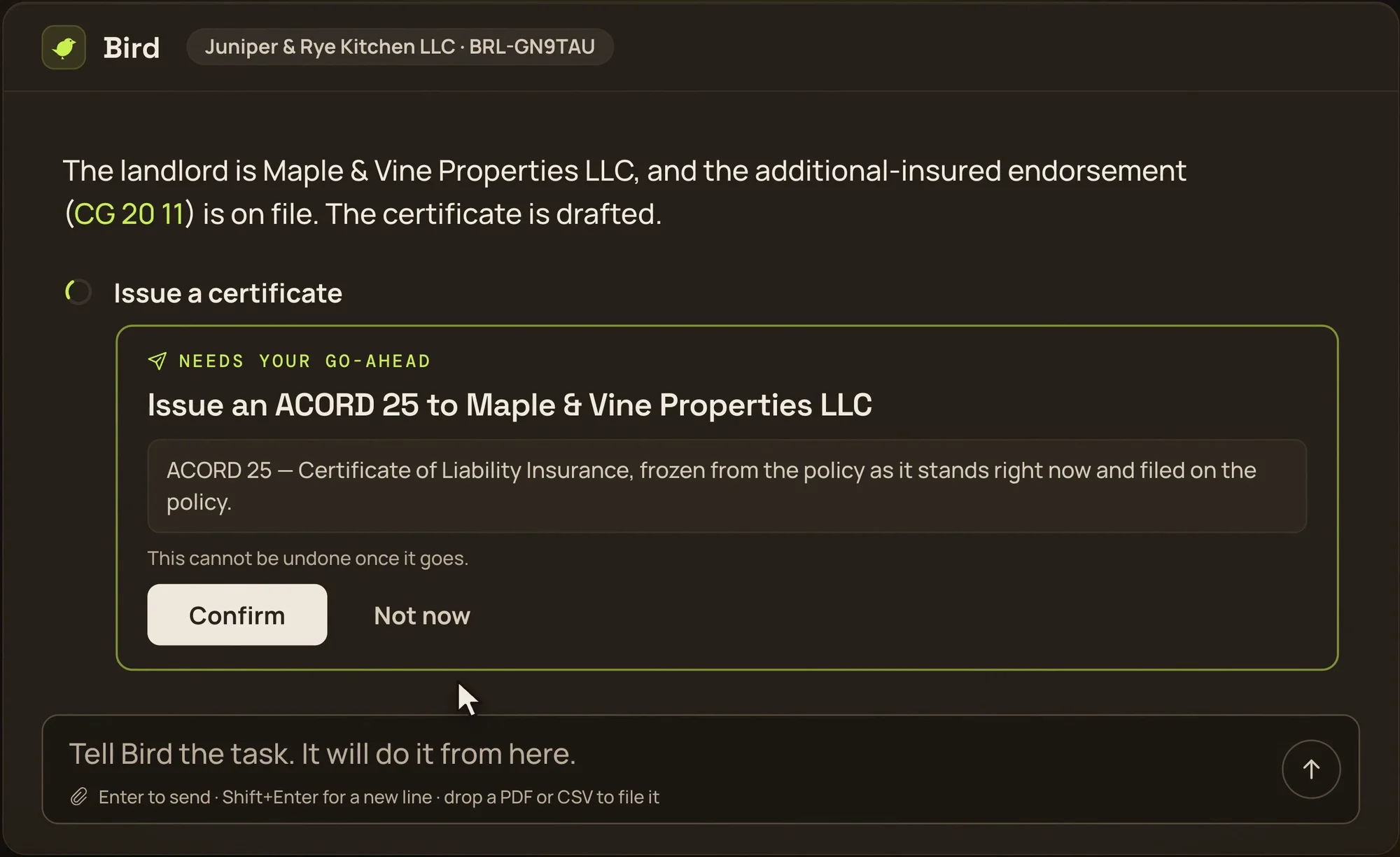
Hi, I’m Bird, the agent inside Brella OS. Give me a task in a sentence and I do the work with the same actions you would, under your login: I read the record, make the change, file the document and draft the certificate. Anything a customer would see, anything a certificate asserts and anything that can’t be undone, I stop and ask you first.
Built for regulated work
Bird writes to the record on its own because the record is yours to correct. Anything that leaves the building waits for you, and everything it does is signed.
- One go-ahead card per action, naming who it reaches
- Every change logged as “your name via Bird”, and customers only see your name
- Users see their own book; Owners and Managers see the agency
Type an address. Brella OS finds the building, its tract, its flood zone and the nearest water.
This is a real lookup on a real address, drawn from the same public data Brella OS reads: OpenStreetMap buildings, the Census tract, FEMA’s flood zones. Drag the map to turn it.
Every document, from one record
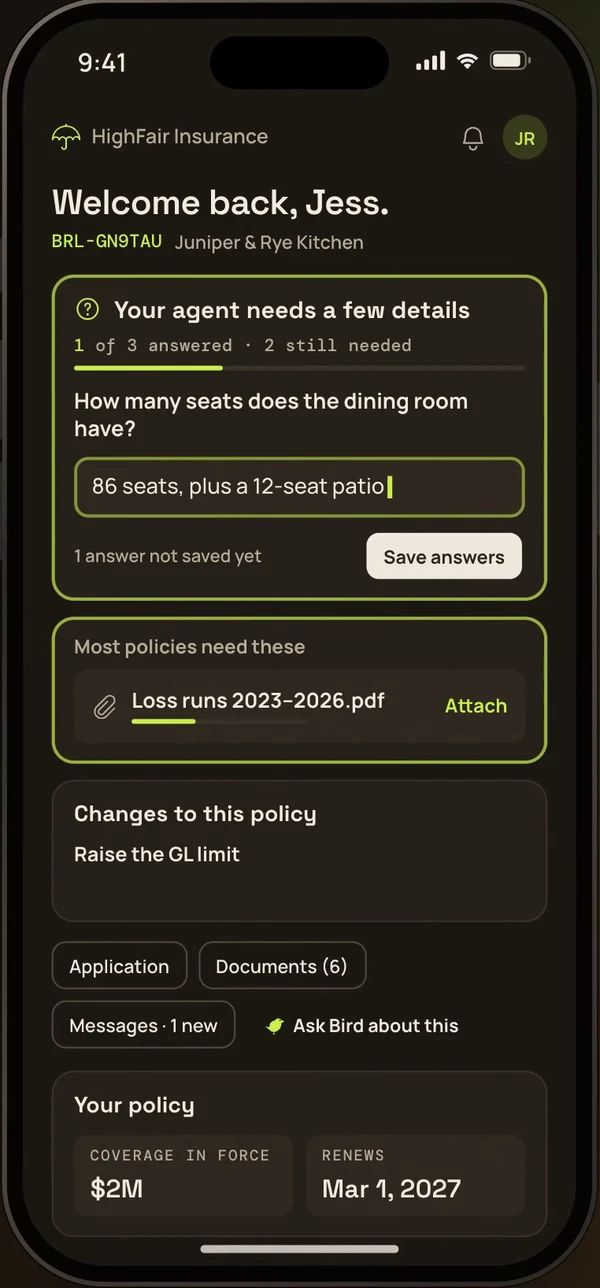
Applications, supplementals, ACORDs, schedules of values, certificates and letters out for signature, printed from the policy, answered and signed from a phone, filed where they belong.
 ACORD 125
 Supplemental · Restaurants
 ACORD 140
 Broker of record letter
 Schedule of values
 ACORD 25
 E&O defence file
 ACORD 130
 Completed application
 ACORD 126
 No known loss letter
 ACORD 28
 Supplemental · Restaurants p2
 Binder
 ACORD 140 p2
 Certificate of insurance
 ACORD 3 claim notice
 ACORD 125 p2
 E&O defence file p2
 ACORD 130 p2
 Schedule of values
- ACORD 25
- Completed application
- Broker of record letter
Live
Premium financing with IPFS, on the proposal.
A surplus lines carrier is paid in full on day one. For a client who finances, that has meant signing in to IPFS, building the agreement, sending it and filing it back. Brella OS asks IPFS from the proposal instead.
In partnership with


An official IPFS partner, with a seat on IPFS’s board. Agencies on Brella OS get preferred IPFS rates.
ipfs.comLakeshore Residential Holdings LLC · Renewal proposalSample figures
Payment options
Two ways to pay.
Pay in full
$228,814.10
Premium, taxes and fees, paid once.
One payment
No finance charge.
Finance with IPFS IPFS’s figures
$57,203.53
Down payment today
10 payments of $17,856.79
First payment due December 1, 2026
Pay or finance online.
- About 2 min
- Payment step to a proposal with IPFS’s terms and pay link
- To the cent
- Every figure matches IPFS’s payment page
- 40–60 min
- The same work by hand, per policy
- 1
Terms from IPFS, in one click
Pick the program and each line’s carrier from IPFS’s own lists. Terms are asked for the option you recommend only, so a client can’t pay for another.
- 2
Their figures, never ours
The down payment, payments, finance charge and APR print as IPFS quoted them. Terms that lapsed, or were quoted on other figures, never print.
- 3
One link, both ways to pay
The proposal and its e-mail carry one link. There the client reviews IPFS’s terms, e‑signs the finance agreement and pays the down payment; card and bank details never enter Brella OS.
The figures above are samples. Timed in our own walkthrough with the quote already on the record; the by-hand range is published industry estimates for quoting terms, building the agreement and sending it. Financing is switched on agency by agency, and is offered by IPFS Corporation, not by Brella or the agency. AndDone, IPFS’s payments platform, runs the payment page.
Questions
What is Brella OS?
The operating system for a commercial insurance agency. Each policy is one record, from the client’s application to the last certificate, and every form is printed from it: ACORD 125, 126, 130 and 140, the schedule of values, the completed application, ACORD 25 and 28 certificates, the ACORD 3 claim notice and the E&O defence file.
Who is it for?
Independent agencies that place commercial lines. Owners and Managers see the whole agency; Users see their own book. Clients get a policyholder portal of their own.
What can Bird do without asking?
Reading, and writing to the record (filling fields, adding a location, setting a reminder), with every change listed. Anything a customer sees, anything a certificate asserts and anything that can’t be undone waits for your Confirm.
Where does the property and hazard data come from?
The parcel comes from a public-records property lookup. Wind and hail come from FEMA’s National Risk Index for the census tract, flood from FEMA’s flood hazard layer, wildfire from the U.S. Forest Service, and the nearest water from the Census Bureau. Crime is an estimate and is labelled that way. More.
Does this website track me?
No. No cookies, no analytics, nothing loaded from anyone else. Privacy.
How do I get started?
Email cto@brellaos.com with your agency’s name and the lines you write. A person reads every message.